Please note: This feature is currently in expansion and may not be available in your country yet. If you cannot find your authority to select during configuration, it means the feature is not yet available for your region. We're continuously working to add support for more countries.
What is the Online Check-in Feature?
The Online Check-in feature (also called Advanced Check-in) is an automated system that helps you collect guest information and submit it to local authorities as required by law. Instead of manually entering data into government portals, Holidu handles the entire process for you. Guests receive a secure online form where they can provide their details, and the information is automatically transferred to the relevant authority at check-in time.
Why Do You Need to Do This?
In many countries including Spain, Italy, Portugal, Germany, and others, hosts are legally required to collect guest information and submit it to local authorities shortly after check-in. This regulation supports security, traceability, and compliance with local laws. Not complying with these rules can lead to penalties or fines. Having a reliable system in place keeps you on the right side of local regulations with minimal effort.
How Do You Benefit from the Automatic Transfer?
The Online Check-in feature automates the guest registration process, delivering several key benefits:
- Legal compliance with minimal effort on your part
- Automatic guest data transfer to the correct authority
- Digital guestbook you can download anytime for inspections
- Built-in reminders and automated guest communication
- Completely free of charge for all Holidu hosts
- Secure, privacy-compliant handling of sensitive guest data
How to Set It Up
Before activating the feature in Holidu, you need to register your accommodation with the relevant local authority. We currently support Spain, Portugal, and Germany, with Italy coming soon. If you cannot find your country or region in the list below, the feature is not yet available for your area.
| Region | Authority | Guidelines |
|---|---|---|
| Spain (except Catalonia/Basque Country) | SES.Hospedajes | How to connect to SES.Hospedajes |
| Catalonia | Mossos d'Esquadra | Connect to Mossos |
| Basque Country | Ertzaintza | Connect to Ertzaintza |
| Portugal | SIBA | How to connect to SEF/SIBA |
| Germany | AVS | How to connect your property to AVS |
| Italy | Alloggiati Web | Guest Check-in Feature in Italy | Statistical Reporting in Italy |
Once you have your credentials from the relevant authority, follow this article to set up your Online Check-in Feature.
What to Do If Your Connection Stops Working
If your authority credentials change or expire, you'll need to manually update them in Holidu. Expired passwords may cause a failed data transfer. Always verify your connection status in the Account section of your Holidu dashboard. If you experience connection issues, check that your credentials with the authority are current and correctly entered in Holidu. Contact Holidu support if problems persist.
How to Connect Ricestat to Your Chekin.io Account
If you are using Ricestat integration with your Chekin.io account, ensure that your Ricestat account credentials are correctly linked. This integration allows for seamless data transfer between platforms. Verify that both your Ricestat and Chekin.io accounts are properly authenticated and that permissions are granted for data sharing.
Troubleshooting: Incorrect Credentials for Ricestat
If you're receiving errors related to incorrect Ricestat credentials, follow these steps:
- Log in to your Ricestat account and verify your login credentials are correct
- Check that your account has the necessary permissions to access the integration
- In your Holidu account settings, disconnect and reconnect your Ricestat account with the correct credentials
- Ensure there are no special characters or spaces in your username or password when re-entering them
- If the issue persists, reset your Ricestat password and update it in Holidu
If problems continue, contact Holidu support with details of the error message you're receiving.
How Does It Work for the Guests?
Once setup is complete, here's what your guests can expect:
- After booking, your guest receives an email or message with a link to a secure online check-in form
- The guest fills out details for all travelers, including document scanning (passport or ID). This information must be provided for everyone traveling with them
- The data is submitted securely and stored in the system
- If a guest doesn't fill out the form, automatic reminders are sent. If they still don't comply, you can fill out the data on their behalf
Important timing: At 11:00 PM on the day of check-in, the guest data is automatically submitted to the relevant authority.
How to Download the Guest Book
Follow these steps to download your digital guestbook:
- Go to the Online Check-in feature page in your Holidu account
- Find the property you want the guestbook for
- Click on "Details" next to the property name
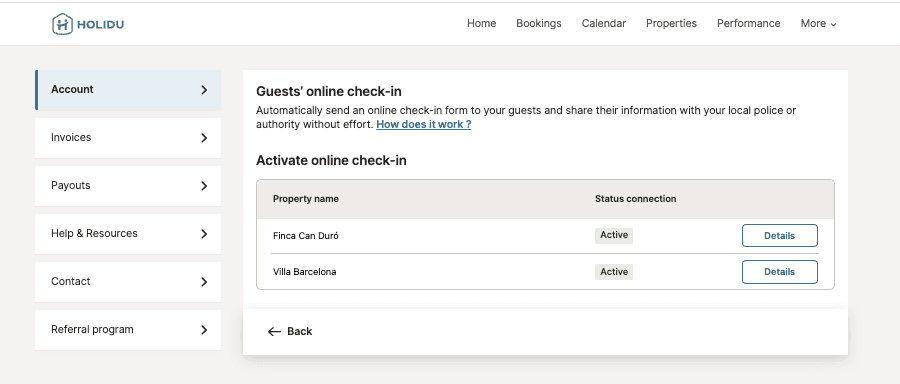

From this screen, you can view, download, and manage your guest records for inspections and compliance purposes.
Frequently Asked Questions
Why does Holidu offer this feature?
Local law requires hosts to register all guests with local authorities. This tool automates the process, supports legal compliance, and saves you time managing manual registrations.
Which authorities can I connect to?
It depends on your region. You can connect to the specific authority for your country and region. Currently supported regions include Spain, Portugal, Germany, and Italy (coming soon). If your region is not listed, the feature is not yet available for your area.
Is registration with the authorities mandatory?
Yes. In countries where this feature is available, guest registration with local authorities is legally required.
Can I use this feature for all types of bookings?
Only bookings created through channels supported by Holidu are eligible. Manual bookings and iCal-based imports are not supported by the Online Check-in feature.
Can I send guest data from previous bookings?
No. The online form is only triggered for future bookings. Bookings made before enabling the police connection are not covered. You'll need to register those manually in your authority's portal.
What guest data is collected and sent?
Personal details including name, date of birth, nationality, ID type, and ID number are collected. Only minimal required data is visible to the host (name and age). Full data is sent securely to authorities in compliance with privacy regulations.
Will I have access to the guest data?
You will only see the names and ages of the guests, which is the required information for the guestbook. We don't display additional information such as ID numbers in your account.
What happens if guests provide their information and then cancel the booking?
If the guest cancels their booking, the data won't be sent to the authorities. The information is only submitted if the booking remains active through check-in.
Will I receive a notification when guests provide their data?
We don't send automatic notifications. However, you can check the booking details to see whether guests have provided their data for each reservation.
Do children need to be registered?
Yes, all guests must be registered regardless of age. For Spanish minors under 14, ID and signature are not required, but the responsible adult's relationship must be recorded.
What happens if guests don't complete the form?
Guests will receive an automatic reminder 5 days before arrival. If the form remains incomplete, you can either:
- Manually fill out the form in the presence of the guest
- Resend the link to the guest
Data must be submitted before 23:00 on the check-in day to benefit from the automated connection to authorities.
Can I fill out the form for my guests?
Yes, you can fill out the form directly from the booking details screen. You can also scan their ID or enter data manually during check-in if needed.
Can I modify data after submission?
No. Once sent to the authority, data cannot be edited. If there's an error, contact Holidu support or re-enter the data manually on your authority's portal directly.
When is the data sent to the authority?
Data is automatically sent at 23:00 (11:00 PM) on the check-in day. Hosts are responsible for ensuring all data is complete and accurate before this time.
Do collaborators have access to this feature?
No. Only primary accounts with editor rights can configure connections to authorities. Collaborators can see the check-in form in booking details but cannot activate or manage the feature.
What happens if my authority credentials change or expire?
You'll need to manually update your credentials in Holidu. Expired passwords may cause a failed data transfer. Always verify your connection status in the Account section to ensure smooth operation.
Is the guestbook legally required?
Yes. The guestbook acts as your digital log for police checks and must be retained for 3 years, as per applicable regulations including Real Decreto 933/2021 in Spain.
Does this work for multi-units?
Yes. The configuration flow works exactly like the existing setup, but multi-unit hosts will be able to configure each unit separately with the authorities.
Do you want to contact us?
We’re here to help. You can contact us directly if you need assistance or have questions.
Contact us